
When to use it
- You're on the Free plan and wondering whether to upgrade.
- You want to know what you'd pay for your number of channels.
- You want to know what stays if you downgrade or cancel.
How it works
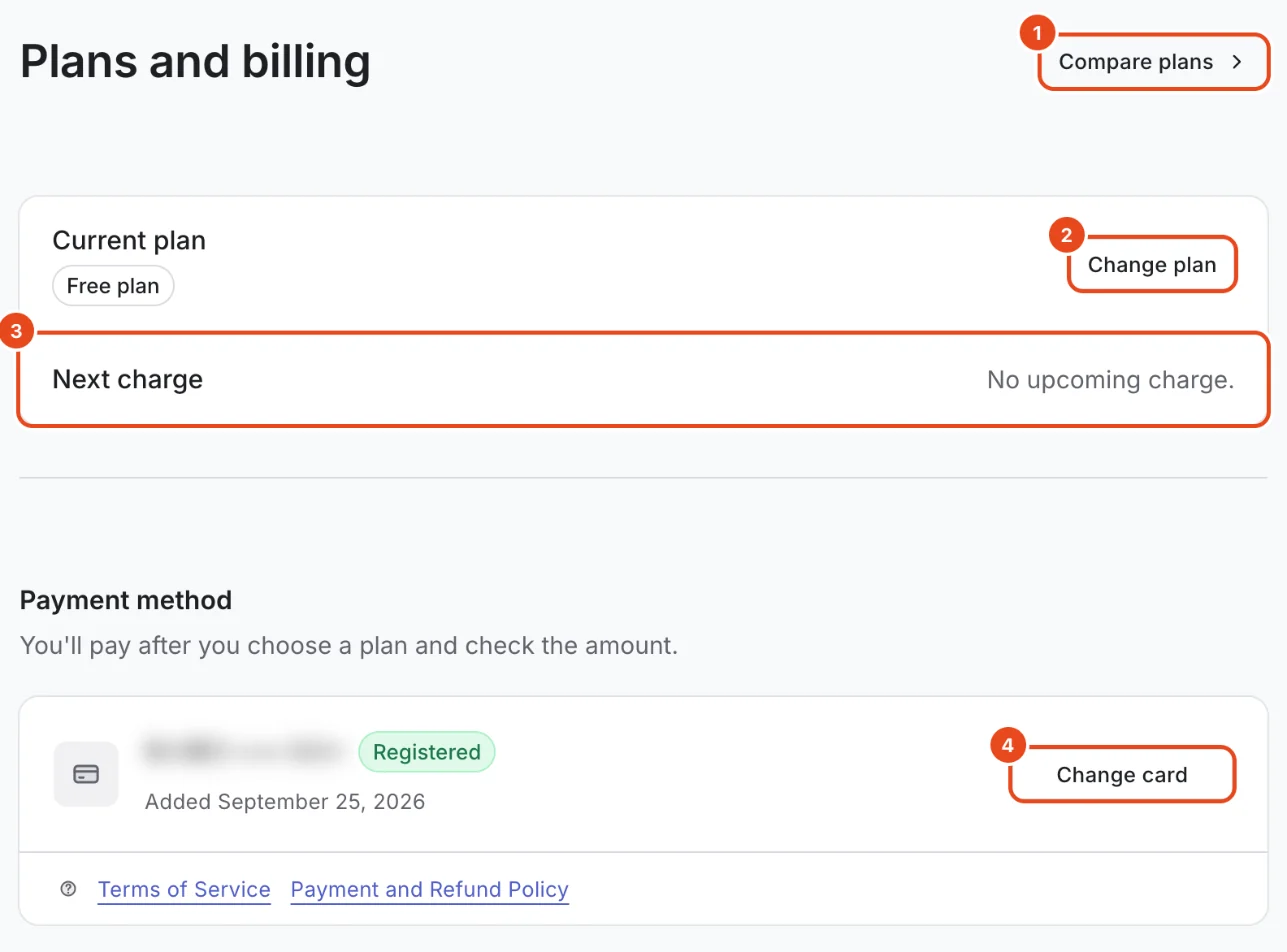
The Plans and billing page
Open Settings › Plan and billing. Current plan and Next charge are at the top.
Check your card under Payment method and change it with Change card. You pay after you choose a plan and check the amount.
Invoices below lists the dates and amounts you've paid.
Usage and coupons
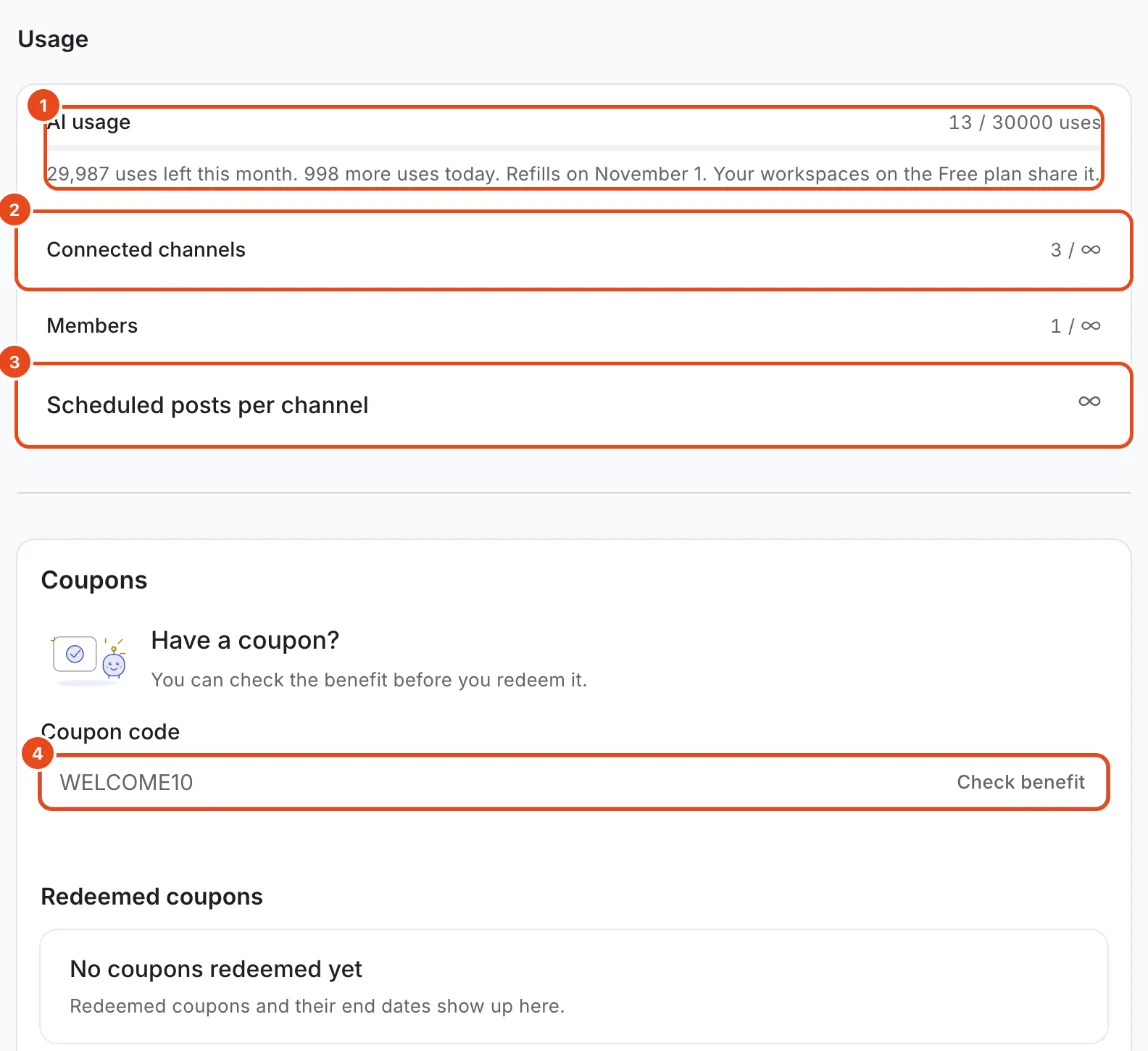
Usage shows AI usage, Connected channels, Members and Scheduled posts per channel against your limits.
Under AI usage, you'll see how many uses are left this month, how many more you can use today and your next refill date.
If you have a coupon, enter it under Coupon code and press Check benefit. You'll see what it gives you before you redeem it.

Compare plans
The owner presses Compare plans on the Plans and billing page.
Choose Monthly or Yearly at the top, and set Channels to your number of channels. Prices update right away.
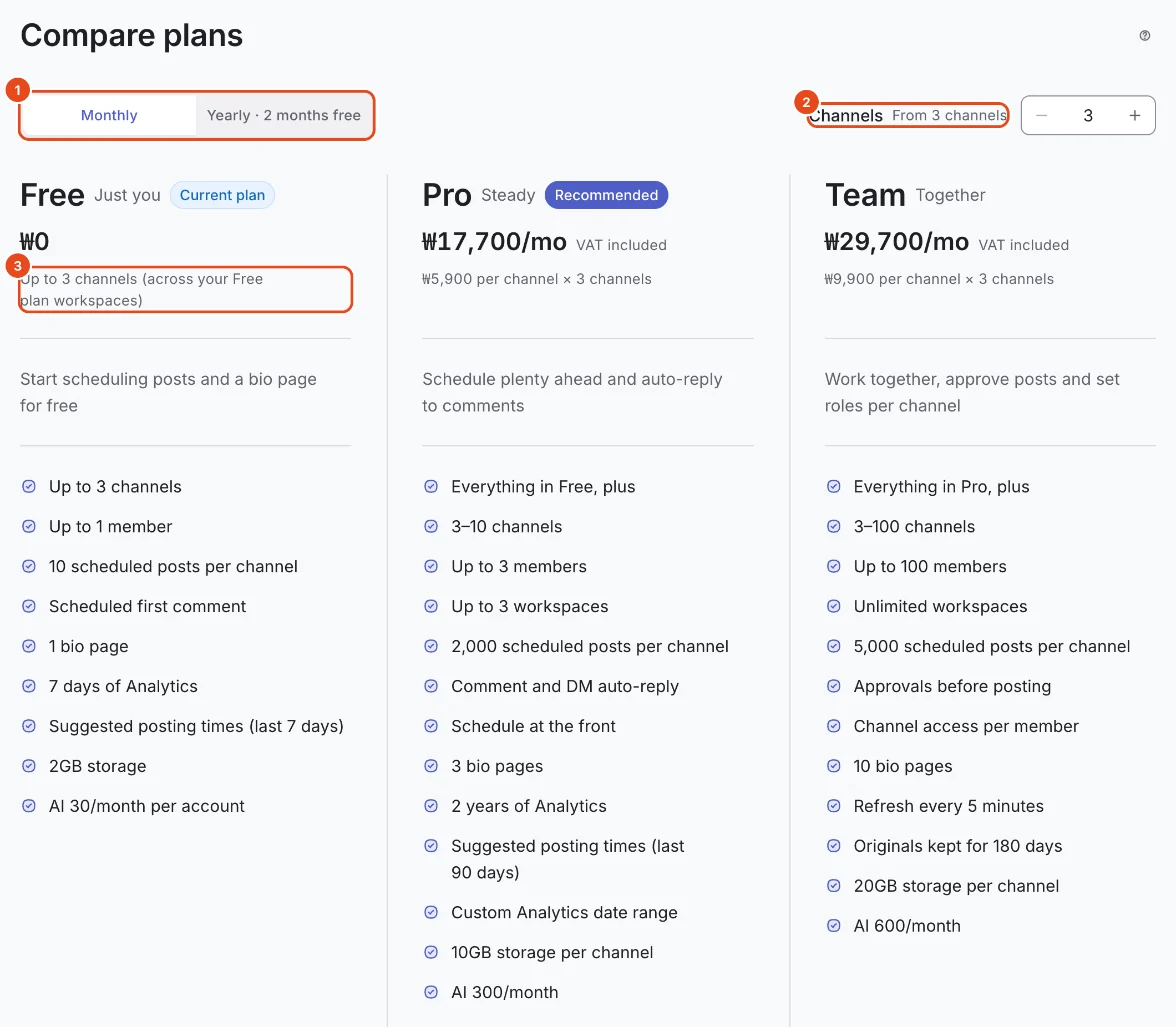
Use the Feature comparison table below to compare limits and features one by one.

Start a paid plan
Press the button under the plan you want. If you can try it for free, you'll see a trial button.
Choose Channels to pay for and a Billing cycle, and the amount to pay appears right away.
Press Start free trial for your first trial, or Pay and start if you've already had one. A trial also needs a card on file.
Downgrade or cancel
Choosing a lower plan or a different billing cycle sets up a Schedule change. It takes effect on your next billing date, and you keep your current plan until then.
The change window shows Features you'll lose and Items over the limit ahead of time.
To cancel, press Cancel and choose Cancel at period end or Cancel now and get a refund. Canceling moves you back to the Free plan.
If a payment fails
If a payment fails, you get a notification and keep paid features during the grace period. Update your card under Payment method.
When the grace period ends, the workspace becomes Restricted. You can still view everything, but new schedules, post edits and AI are blocked. You can still cancel scheduled posts and disconnect channels.
Options at a glance
| Item | How it works |
|---|---|
| Amount | Per-channel price × channels you pay for. VAT included. |
| Counting channels | Instagram and Threads on the same account count as two channels. |
| Minimum channels | If you connect fewer, you still pay for the minimum. |
| Yearly billing | 2 months free compared with paying monthly. |
| Upgrading | Takes effect right away. You pay for a full new period, and that day becomes your new billing date. |
| Downgrading | Takes effect on your next billing date. |
| Monthly ↔ yearly | Takes effect on your next billing date. |
| AI uses | Added for each paid channel and shared across the workspace. Unused uses don't carry over. |
Free and paid plans
| Item | Free | Pro | Team |
|---|---|---|---|
| Monthly price per channel | Free | ₩5,900 | ₩9,900 |
| Minimum channels | None | 3 | 3 |
| Free trial | None | 14 days | 14 days |
| Connected channels | 3 | 10 | 100 |
| Members | 1 | 3 | 100 |
| Scheduled posts per channel | 10 | 2,000 | 5,000 |
| AI uses | 30 per account a month | 100 per paid channel a month | 200 per paid channel a month |
| Bio pages | 1 | 3 | 10 |
| Storage | 2GB | 10GB | 20GB |
| Comment and DM auto-replies | Not included | Included | Included |
| Schedule first | Not included | Included | Included |
| Approvals and per-channel access | Not included | Not included | Included |
| Grace period after a failed payment | None | 7 days | 7 days |
The Free plan still includes link DMs, which send only your bio page link.
Good to know
- Each workspace has its own plan. Switch workspaces to see that workspace's plan.
- On the Free plan, AI uses belong to your account, so your Free plan workspaces share them.
- Prices include VAT. You'll see the amount to pay once more before you pay.
- You can check a coupon's benefit and duration before you redeem it.
Frequently asked questions
How many times can I start a free trial?
Once per Moyeo account. If you've already had a trial, a new workspace starts with payment right away.
Does downgrading delete my data?
No. Members, channels and scheduled posts over the new limit stay. You just can't create new ones. Auto-replies stop, but their settings are kept.
How much do I get back if I cancel now?
Choose Cancel now and get a refund and you'll see the refund amount first. The plan is canceled only after you confirm.
Who manages billing?
Only the owner changes plans and pays. Other members can still see plans and features, so ask the owner if you want a change.
Are Free plan channels counted per workspace?
No. They're counted across all the Free plan workspaces you own. To use more channels, upgrade one workspace or disconnect channels in another.