
Schedule posts to multiple social channels
Pick several channels in one new post. Write the shared copy once, then adjust the wording and media for each channel.
What you can use depends on your connected channel's permissions and your plan.
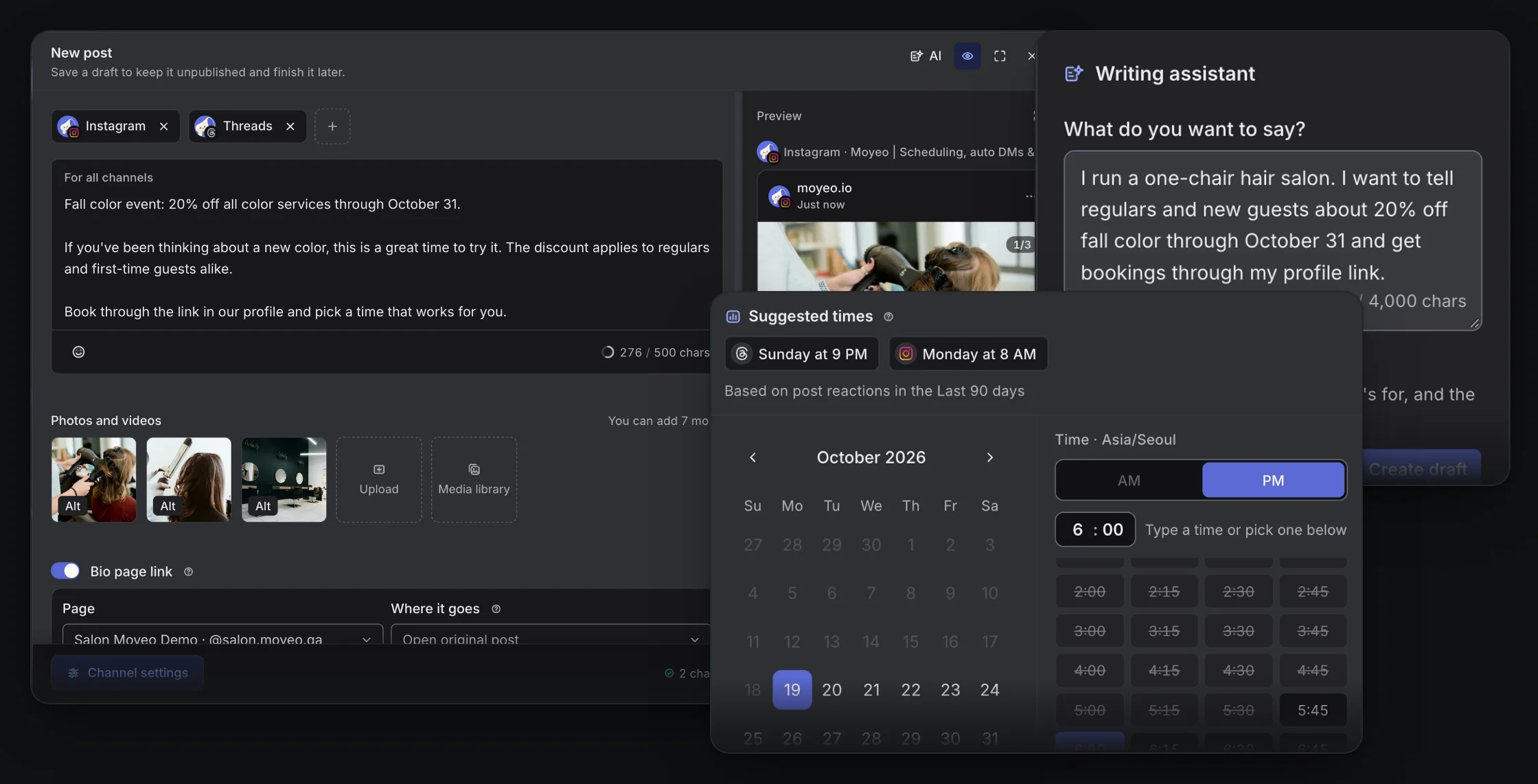

Writing one post for several channels and checking the calendar in Moyeo.
Write once, adapt per channel
Start from shared copy, then change the wording, photos and videos for each channel. Check how each one will look in the preview.
Move posts on the calendar
See scheduled posts by month, week or channel, and drag them to a new date and time.
Fill the next open slot
Set the days and times you post, and new posts go into the next open slot. You can also pick from suggested times.
A bio page link on every post
Moyeo adds your bio page link as the first comment on Instagram and at the end of the text on Threads and YouTube.
How it works
See the full guideConnect your Instagram, Threads and YouTube channels in your workspace.
Pick every channel you want in New post, then add the shared copy, photos or videos.
Check the wording and settings for each channel, and see how they'll look in the preview.
Pick a date and time, or the next slot in your posting schedule, and check the calendar.
Supported accounts
Connect an Instagram Business or Creator account, a Threads account and a YouTube channel, and allow publishing access.
Formats and limits
You can schedule to Instagram, Threads and YouTube Shorts today. Other channels are coming soon.
Each channel has its own media formats and character limits. The composer shows them for every channel.
Approvals before posting are only on the Team plan. Scheduled first comments are included on the Free plan.
A post may not go out because of permissions, the connection or platform policies. Check the result in the post's status.
Plans
See all plansMonthly prices, VAT included. Checkout opens soon. Sign up and request a plan in your workspace, and we'll review it and turn it on. Payment and Refund Policy (in Korean)
Prices are in Korean won (KRW), and card payments go through Toss Payments. Cards issued outside Korea may not work.
Can I schedule to several channels at once?
Yes. Pick Instagram, Threads and YouTube in New post and schedule them together. You can change the wording and media for each channel.
Can I change a scheduled post's time or content?
Yes. Drag it on the calendar or open the post to change the time. When you edit the post, pick which schedules to update and they change too.
Can I schedule posts on the Free plan?
Yes. The Free plan includes scheduling to several channels and the calendar. See the plans table for how many channels you can connect.
Schedule your next post with Moyeo
Sign up and make your first post and bio page right away.