
When to use it
- You keep typing the same answer to common comments like "price" or "booking".
- You want to DM your bio page link to anyone who comments.
- You want incoming DMs to get your hours or booking info automatically.
- You want to reply on Threads when someone mentions your account in their post.
How it works
Create a comment auto-reply
Under Channels in the sidebar, expand an Instagram or Threads channel and press Comment auto-reply.
The top shows the channel name and how many you've made out of your limit. Your auto-replies are cards under List, each with its keywords, the reply it sends, how many times it replied in the last 7 days and an on/off switch.
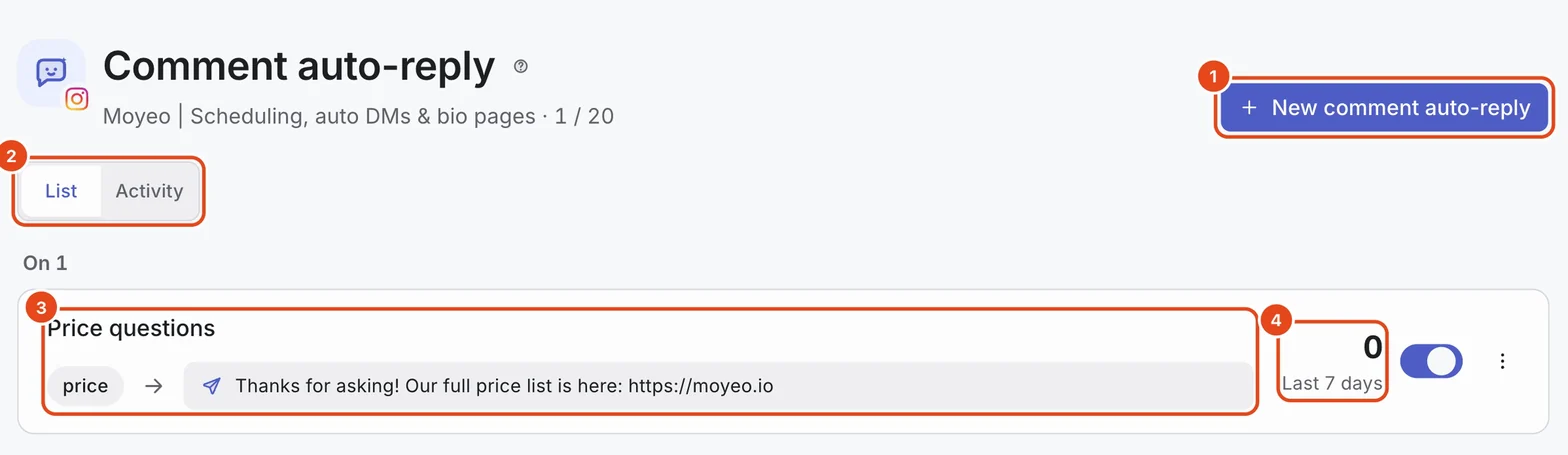
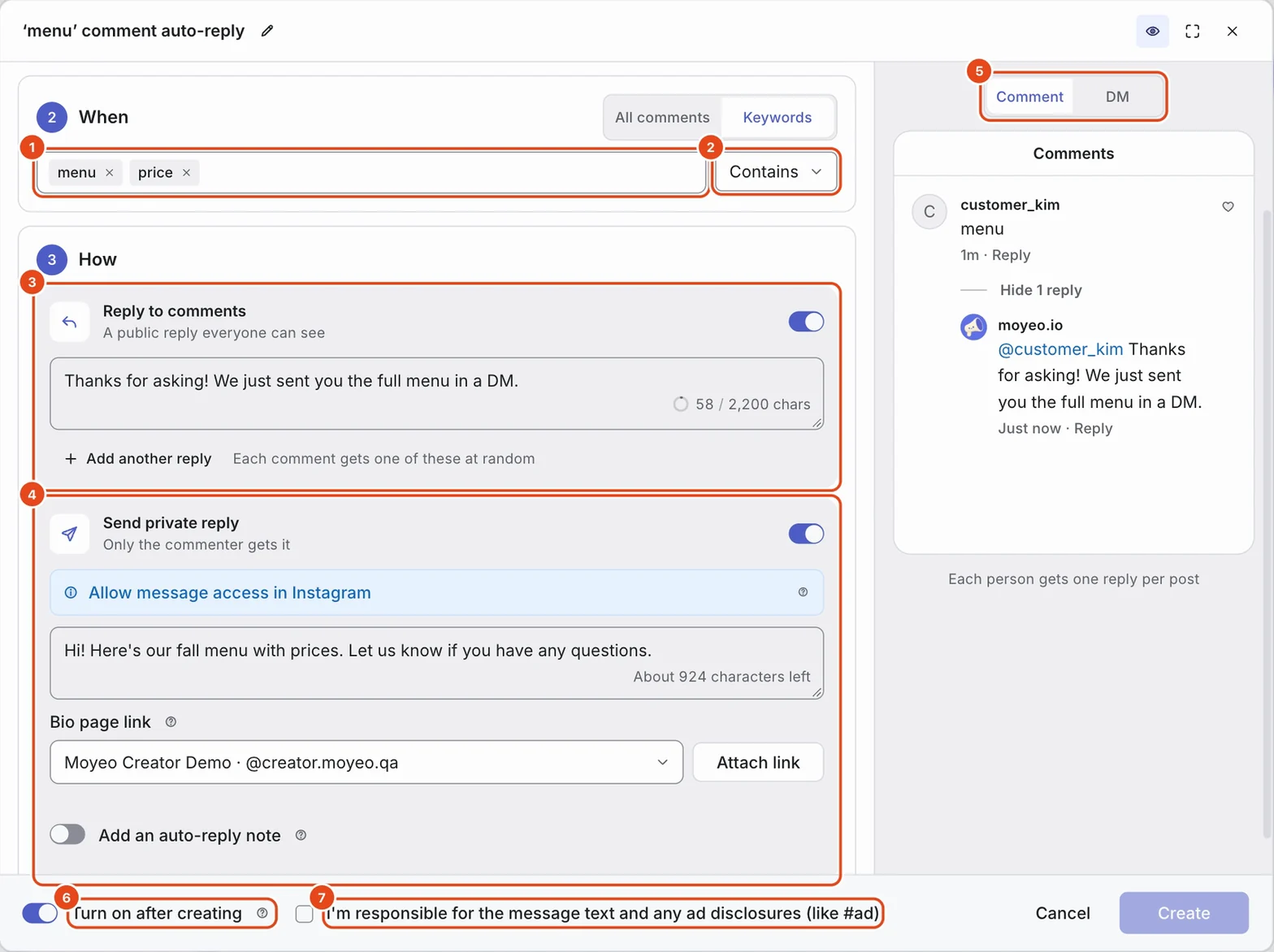
Press New comment auto-reply to open the editor. Set the three steps on the left and check how it looks to customers in the preview on the right. Use the pencil button at the top to rename it.
Under Where, choose All posts or Choose posts. You can pick up to 20 posts.
Under When, choose All comments or Keywords. Type a keyword and press Enter, or paste several separated by commas. Pick Contains or Exact match under Match type on the right.
Under How, turn on Reply to comments, Send private reply or both, and write what to send.
Check I'm responsible for the message text and any ad disclosures (like #ad) and press Create. With Turn on after creating on, it replies to comments that come in from then on.

Send a reply and a DM together
Reply to comments posts a public reply everyone can see. Use Add another reply to add up to 5 versions, and each comment gets one of them at random.
Send private reply sends a message only the commenter sees. It's available on Instagram only.
Press Attach link under Bio page link and pick a page to add your bio page address to the end of the DM. Visitors who tap it show up in your bio page analytics as coming from a DM link.
Turn on Add an auto-reply note to end the DM with Sent as an automatic reply.
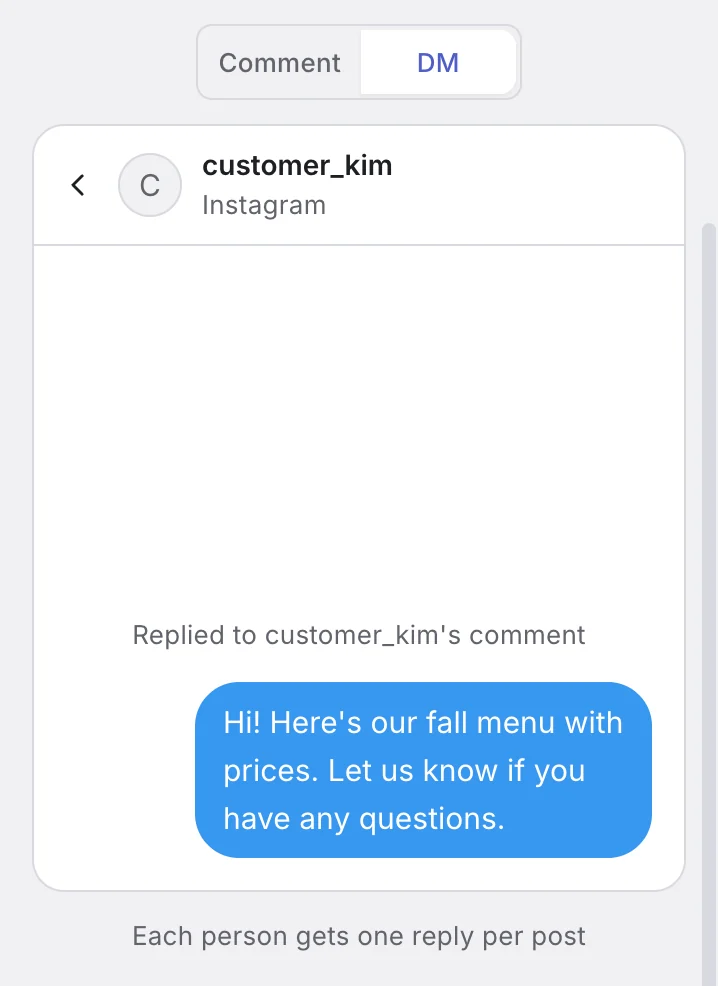
Press DM above the preview to see the DM customers will get.

Allow message access in Instagram
To send private replies or use DM auto-replies, turn on one setting in the Instagram app. Moyeo can't tell whether it's on, so the editor keeps showing Allow message access in Instagram.
Open the Instagram app on your phone and go to Settings from your profile menu.
Tap Messages and story replies, then Message controls.
Under Connected tools, turn on Allow access to messages.
Reply to Threads mentions too
When you create one on a Threads channel, What to reply to appears under Where.
Comments are replies to your posts, and Mentions are other people's posts that @mention your account. Pick one or both.
If you see Reconnect the channel to reply to mentions too., reconnect the Threads channel to add the mentions permission.
Create a DM auto-reply
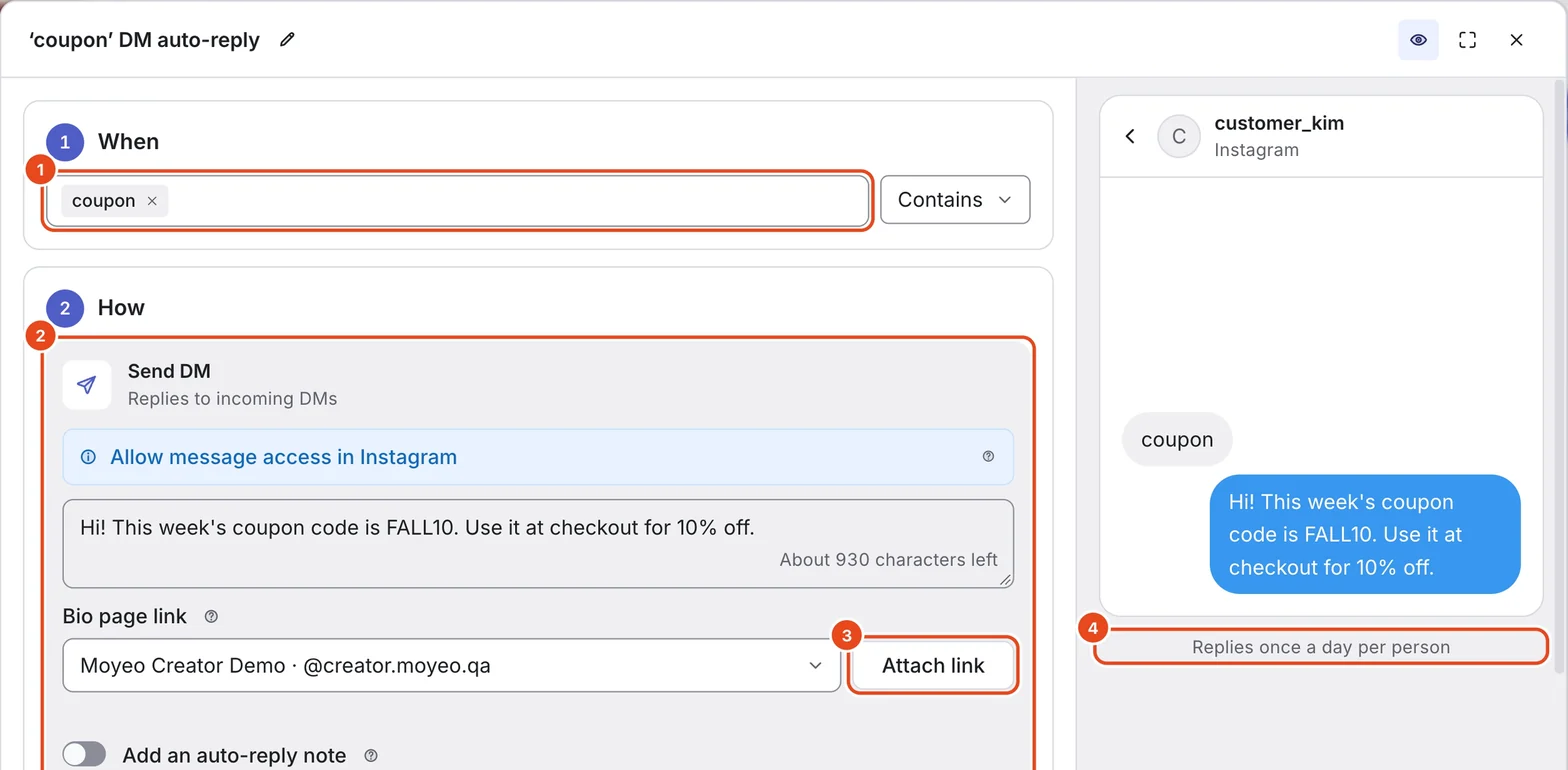
Expand an Instagram channel and press DM auto-reply.
The first time, you'll see Two things to set up before you use DM auto-replies. Reconnect the channel to add the DM permission, and turn on Allow access to messages in the Instagram app as described above.
Add keywords under When and pick a Match type. DM auto-replies need at least one keyword.
Write the reply under Send DM in How, and press Attach link under Bio page link if you want. Check what customers will get in the preview.
Press Create, and it replies to DMs that arrive from then on.

Check the activity log
Press Activity at the top of the auto-reply page to see, by date, what was sent to which comment.
Filter by Sent, Failed or Skipped, or pick a single auto-reply under Auto-replies on the right.
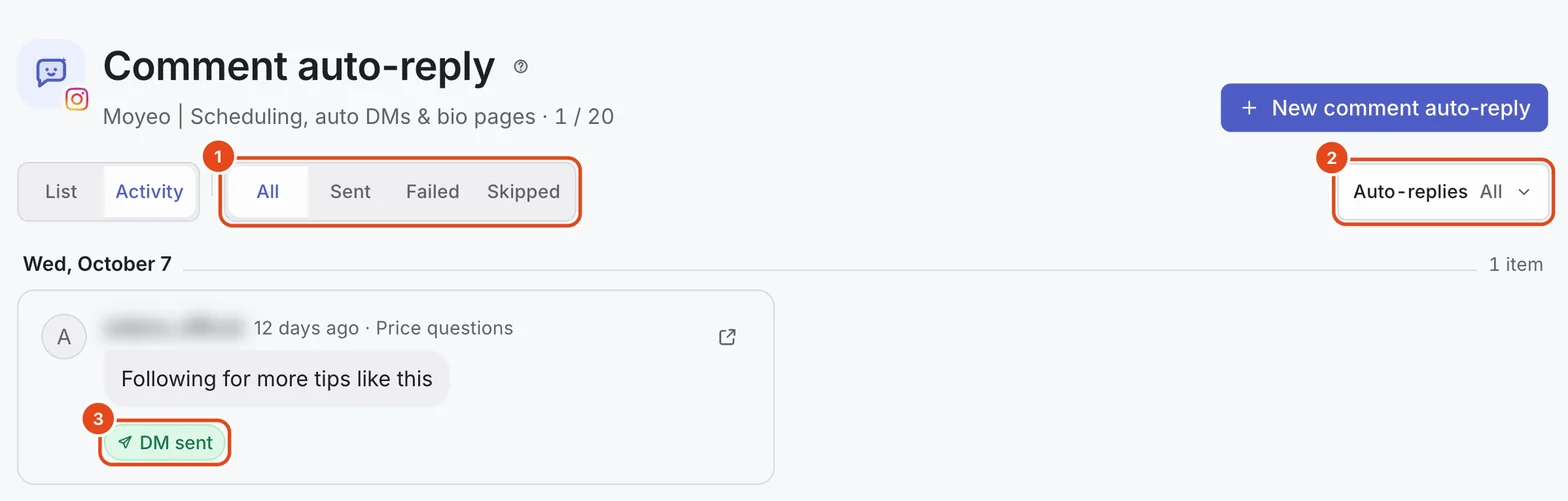
Each row's label shows the result.

| Label | What it means |
|---|---|
| Sent | The reply or DM went out. |
| Sending | It's being sent now. |
| Waiting to retry | It failed briefly and is waiting to be sent again. |
| Failed | It couldn't be sent. The reason is shown in the row. |
| Skipped | Not sent because the person already got a reply or the time window passed. |
| Needs a result check | The platform didn't report back, so it needs checking. |
Options at a glance
| Option | What it does | Good to know |
|---|---|---|
| Where | Replies on all posts or only the ones you choose. | Pick up to 20 posts. |
| What to reply to | On Threads, chooses comments, mentions or both. | Threads only. |
| When | Replies to every comment or only those with a keyword. | Up to 20 keywords, 2 to 30 characters each. |
| Match type | Contains replies when the keyword appears; Exact match when the whole comment matches. | Case and spacing are ignored. |
| Reply to comments | Posts a public reply under the comment. | Add up to 5 versions and one is picked each time. |
| Send private reply | Sends a DM only to the commenter. | Instagram only. |
| Bio page link | Adds your bio page address to the end of the DM. | You need a published bio page. |
| Turn on after creating | Turns the auto-reply on as soon as it's created. | Only replies to comments that come in after that. |
Each channel can have up to 20 comment auto-replies and 20 DM auto-replies.
Free and paid plans
| Item | Free | Pro | Team |
|---|---|---|---|
| Comment and DM auto-replies (replies and text) | Not included | Included | Included |
| Link DMs per month | 50 | No limit | No limit |
Comment and DM auto-replies share the same Link DM allowance. When it runs out, sending resumes on the 1st of next month, and comments in between are logged as Skipped.
Good to know
- Use the switch on a card to pause an auto-reply. Comments that arrive while it's off don't get a reply, even after you turn it back on.
- Your text goes to customers as is. For discounts or promotions, add a disclosure like #ad yourself.
- Replies posted by an auto-reply carry an Auto-reply badge in the Inbox.
- A channel can use comment auto-replies in only one workspace at a time.
Frequently asked questions
Does it reply to older comments?
No. It only replies to comments that come in after the auto-reply is turned on.
If the same person comments several times, do they get a reply each time?
No. Each person gets one reply per post. DM auto-replies answer the same person once a day.
My DMs aren't going out.
First check that Allow access to messages is on in the Instagram app. DMs also aren't sent on age-restricted posts, or once 7 days have passed since the comment. Each row in the activity log shows the reason.
Can I use it on YouTube comments?
No. Comment auto-replies work on Instagram and Threads, and DM auto-replies on Instagram only.
What happens to my auto-replies if I downgrade?
New replies stop going out, but you can still see past activity. You can turn off or delete the remaining auto-replies.