Skip to content

Social media for solo owners, creators, startups and local shops

Get the word out,
whoever you are

What to post, when to post it, how to answer every comment. Doing it alone is a lot. Moyeo helps you post, reply, welcome visitors and see what worked, all in one place.

Start on the Free plan. It works right in your browser.

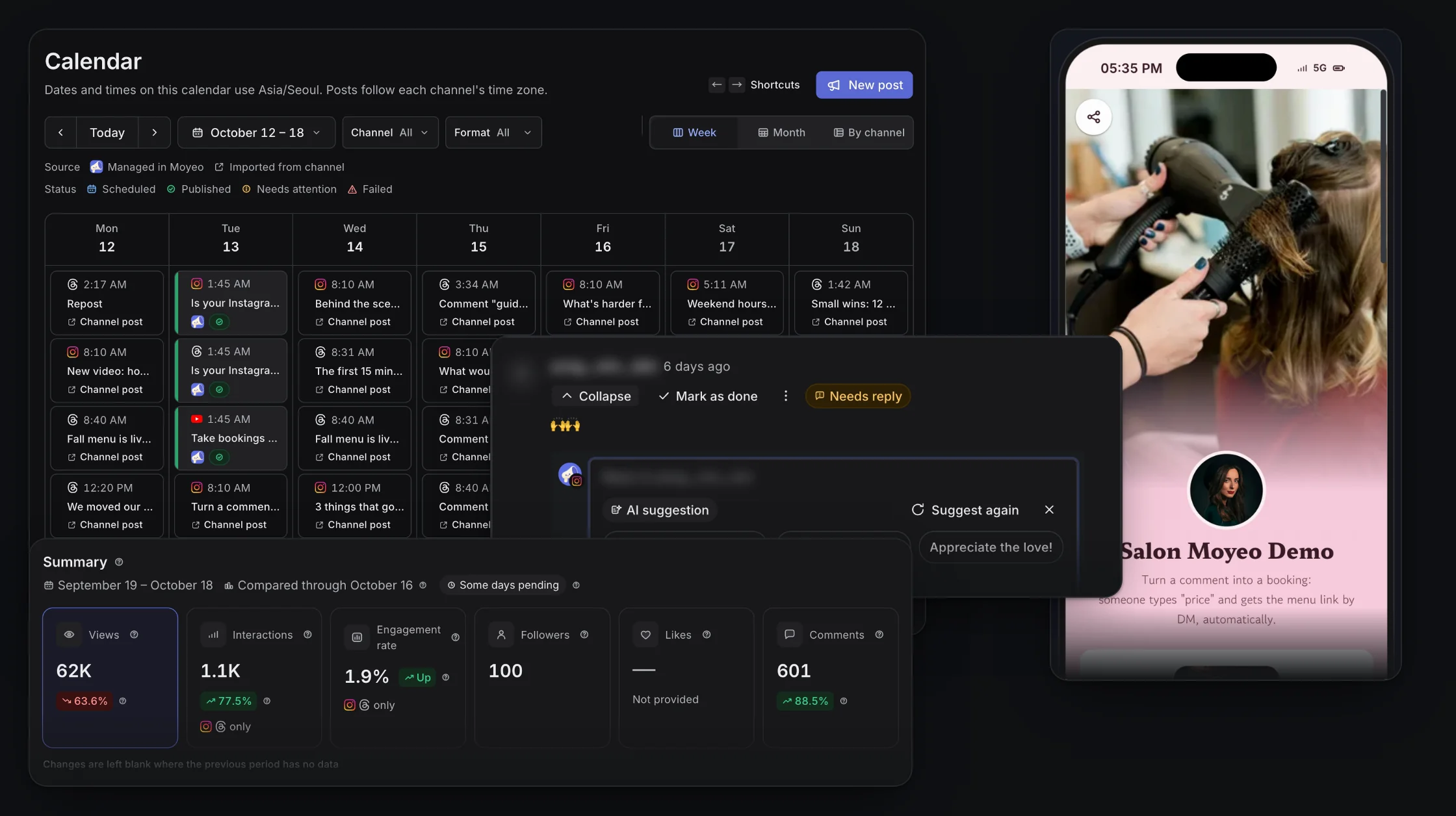
Real Moyeo screens: a By channel calendar with format badges and covers, AI reply suggestions for a comment, a salon bio page on a phone, and an Analytics summary.
Suggest a feature

How it works

What separate tools split up, Moyeo keeps together

  1. PostWrite once, schedule everywhere
  2. ReplyAnswer every comment in one place
  3. WelcomeVisitors book from your bio page
  4. LearnSee what worked

1. Post

Write once, post to every channel

Write once, then tailor the text and media for each channel. Start from an AI draft if you like, and see your scheduled posts on the calendar by channel, covers and all.

  • Preview each post and how your profile will look
  • Pick a time or drop it into the next open slot
  • Schedule the first comment and hashtags too
  • Pick up drafts and reuse files from your media library
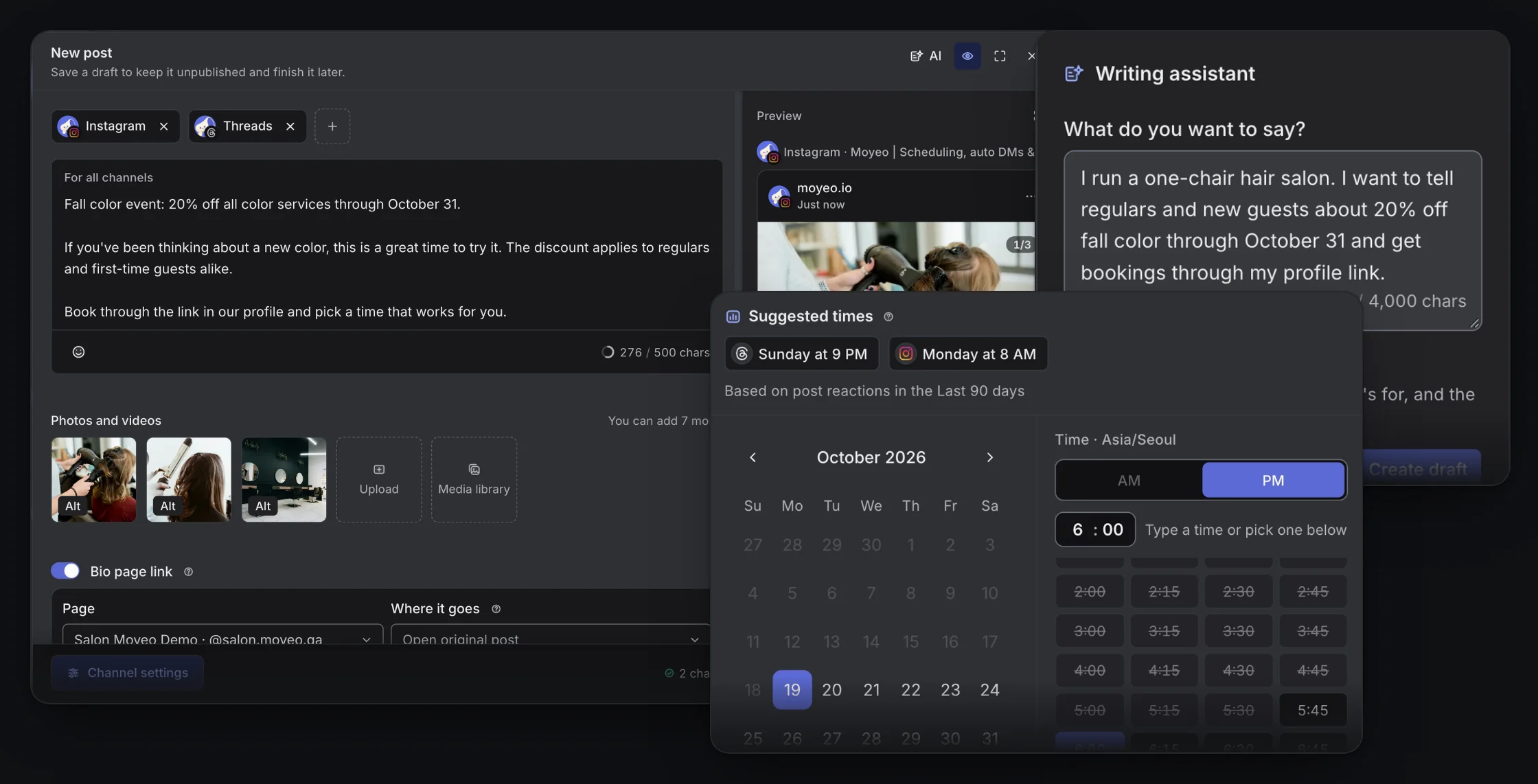
Real Moyeo screens: the composer drafting a fall color promotion with three salon photos for Instagram and Threads with channel previews, the AI writing assistant, and the scheduler with suggested posting times.
Write once, schedule everywhere
  • Instagram
  • Threads
  • YouTube

3 spots left for this weekend's class

Instagram3 spots left for this weekend's class
07:30 PM
Threads3 spots left for this weekend's class
07:30 PM
YouTube3 spots left for this weekend's class
07:30 PM

Scheduled to 3 channels
2. Reply

Every comment in one inbox

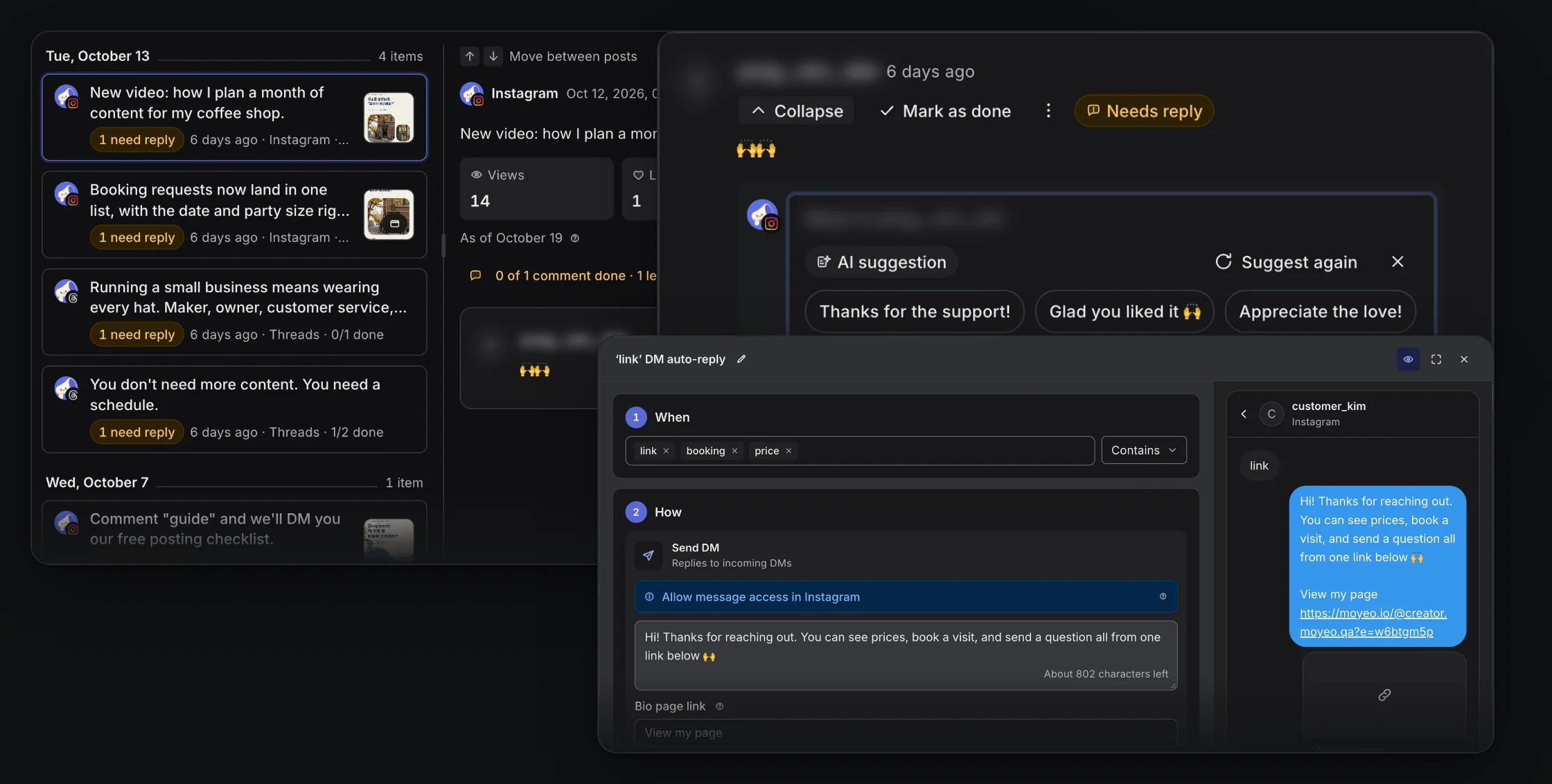
Comments from Instagram, Threads and YouTube land in one inbox, with the ones that need you on top. Comments and DMs with your keywords get answered automatically.

  • AI reply suggestions that match their tone
  • Auto-reply and DM on keyword comments
  • Auto-answer Instagram DMs by keyword
  • Clear things fast with filters, bulk actions and shortcuts
Real Moyeo screens: the comment inbox with posts that need a reply, English AI reply suggestions for an Instagram comment, and a DM auto-reply that sends a bio page link.
Reply suggestions in their tone
G
@guest.sample

omg where'd you get this?? so cute

Reply suggestions
  • thank you! it's all in my bio link
  • right?? it's on my bio page
S
@sample.studio

thank you! it's all in my bio link

You replied

3. Welcome

Visitors book right on your bio page

Send your bio page link by DM to people who comment. Bookings and inquiries come in on that page, and you see them all in one place.

  • Booking, inquiry, newsletter and coupon blocks
  • See which post each visitor came from
  • Email your regulars when there's news
  • Can show up on Naver and Google
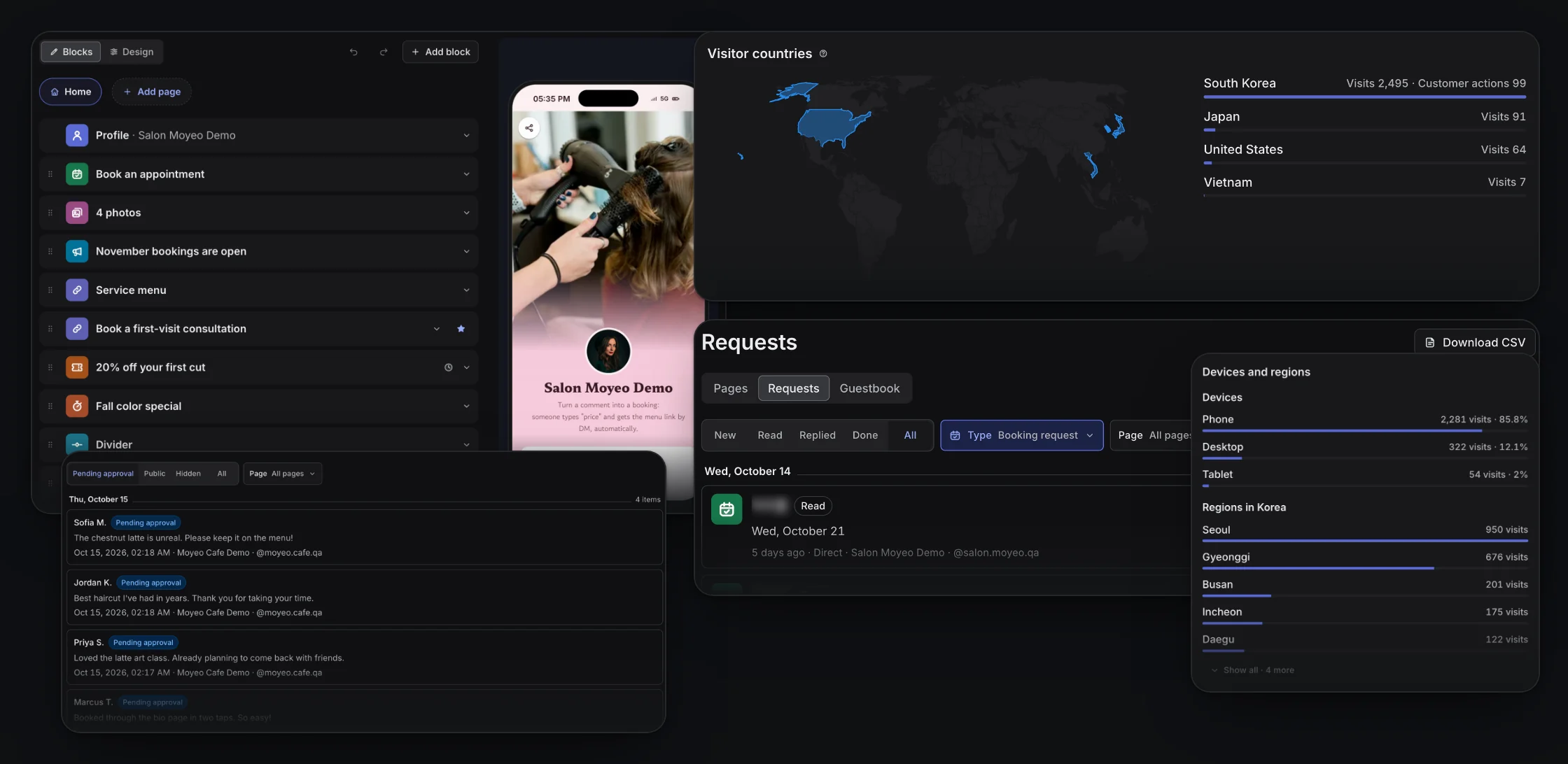
Real Moyeo screens: a hair salon bio page in the block editor with a phone preview, visitor countries on a world map, devices and regions over the last 90 days, booking requests, and guestbook entries waiting for approval.
Comment auto-reply
G
@guest.sample

What's the price?

S
@sample.studioAuto-reply

Sent it to your DMs!

Link DM

Prices and booking are all here

moyeo.io/@sample.studio

4. Learn

Know which posts worked

Views and engagement for each channel, over any period. Once you know what worked, picking the next post gets easier.

  • Instagram, Threads and YouTube on one screen
  • Top formats and topics, plus the best times for your account
  • Follower age, gender, location and traffic sources
  • AI suggests what to post next
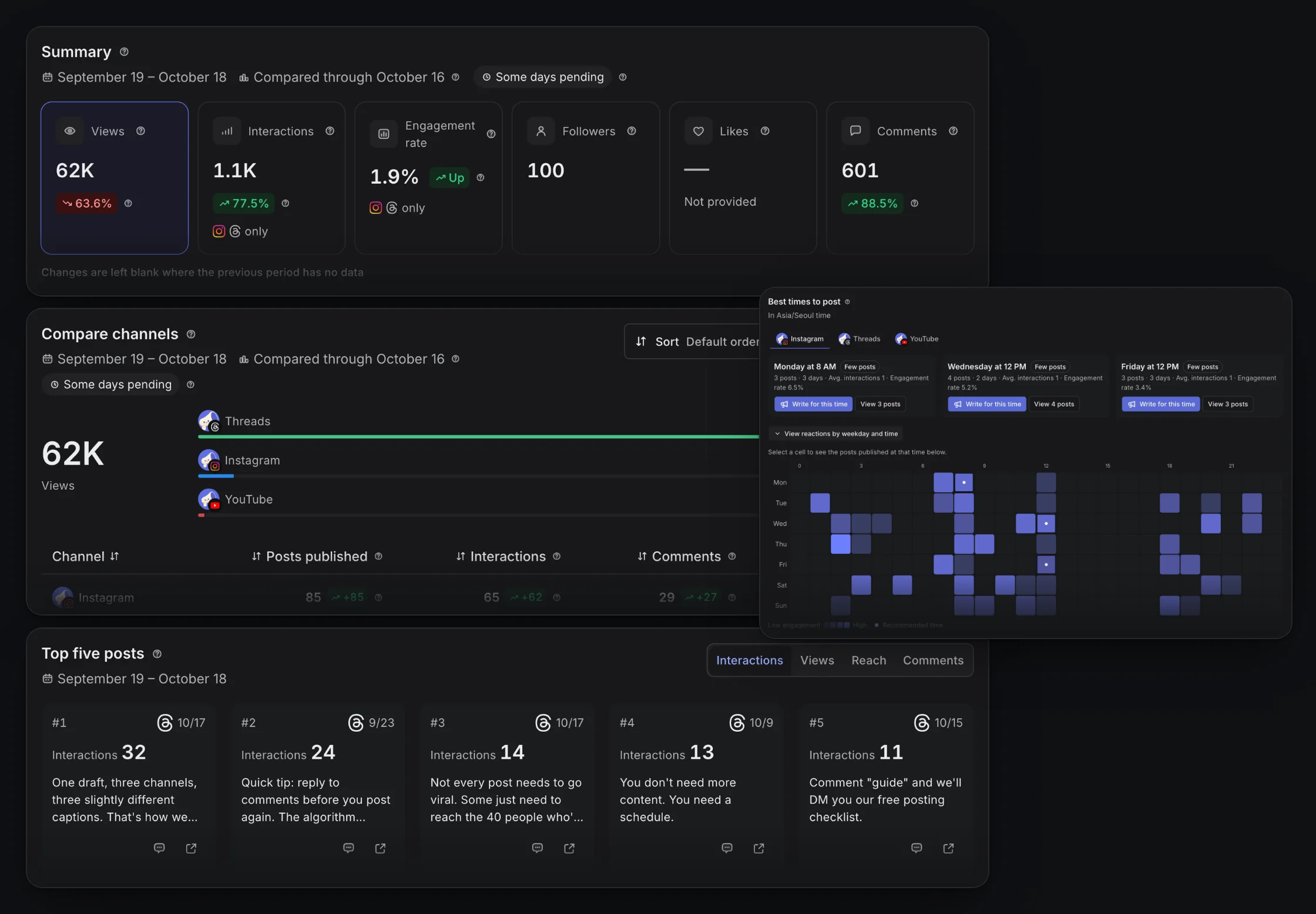
Real Moyeo screens: an Analytics summary with views, interactions, engagement rate, followers, likes and comments in one grid, the Compare channels table, top posts, and best times to post by day and hour.
Insights by channel
Views
  • Instagram12.4K
  • Threads8.3K
  • YouTube5.1K
Top posts
Weekend class recap4,820 views
Best time to postSat 07:00 PM
Download CSV

Who uses it?

Take bookings and inquiries from one profile link

Pick an example and scroll through it. Every one is a Moyeo bio page.

Example: a cooking creator with a recipe email, merch and sponsorship inquiries

What your bio page can do

Booking requests from your bio page
Booking request
  • Fri13
  • Sat14
  • Sun15
Booking request
Alex SampleNew

Sat, November 14

From a Instagram post

Reply sent by email

Newsletters
Write email
SubjectNew classes open this weekend
128 recipientsSent
Send
Subscriber trend
12 subscribed
  • Take bookings and inquiries

    Every request lands in one place, and you can reply by email.

    Email replies start on Pro.

  • Send newsletters

    Email everyone who signed up for news on your page.

  • Coupons and countdowns

    Show a discount coupon or count down to an opening or deadline.

  • Hours, map and contact

    Add opening hours, closures, a map and ways to reach you, from a phone number to KakaoTalk.

  • Products, photos, video, music and files

    Put store products, photos, YouTube videos, music and PDFs on one page.

  • Guestbook and reviews

    Visitor notes show up only after you approve them. Pin great comments as reviews.

  • QR codes and share links

    Make a separate share link for each post and download a QR code.

  • Show up on Naver and Google

    Add your area, business type and keywords so search can find you, even on the Free plan.

There's more

The small stuff, handled too

  • AI that drafts, polishes and replies

    Drafts, fixes for spelling, tone and length, replies that match the commenter's tone, and post ideas. Only the text you pick gets posted.

  • See which posts bring customers in

    Each post gets its own bio page link, so you can see which post sent people your way and which ones led to bookings or inquiries.

    Available on Pro and up.

  • Auto-replies on Threads, too

    When a comment has your keyword, like on a giveaway post, Moyeo answers right away. Instagram gets a reply and a DM, Threads gets a reply.

    The Free plan sends link DMs only. Write your own replies and DMs on Pro and up.

  • From audience to CSV

    See follower age, gender and location, and download post, daily and link results as CSV.

    CSV downloads start on Pro.

  • Work as a team

    Invite people to your workspace. Get approval before anything goes out and set access per channel.

    Approvals and per-channel access are on Team only.

  • Post on a steady schedule

    Set weekly time slots and new posts fill the next open one. You'll know when a slot is getting crowded.

    Posting schedule
    Instagram
    SMTWTFS09:00 AM07:30 PM
    New menu photoFollow posting schedule

    Scheduled by your posting schedule. No. 3 in line.

  • Get a heads-up

    Hear about posts that went out or failed, new comments and new requests in the app, by email or web push. Set quiet hours, too.

  • Bring your link page

    Import your links from Litt.ly, Linktree or Inpock Link.

  • Works the way you do

    Use the app in Korean or English, with dark mode and keyboard shortcuts. Add it to your phone's home screen to open it like an app.

Separate tools vs Moyeo

No more stitching tools together

  • Scheduling to several channels
    Separate tools: A separate scheduler
    With Moyeo: Write once, schedule for each channel
  • Comment and DM auto-replies
    Separate tools: A separate DM tool
    With Moyeo: Turn them on for Instagram and Threads on one screen
  • Bio page, bookings and newsletters
    Separate tools: A separate link-in-bio tool
    With Moyeo: One bio page handles it all
  • From post to booking
    Separate tools: Lost between tools
    With Moyeo: See which post they came from
  • Logins and billing
    Separate tools: One for every tool
    With Moyeo: Just one

Security

How we protect your channels and data

We never ask for your channel passwords. You connect through each platform's own login.

  • Only the access you choose
  • Photo locations are removed before posting
  • Log in on up to 5 devices
  • Disconnecting deletes the data we brought in
  • Visitor contact details are encrypted too
  • Usage data only goes toward improving Moyeo
See how long we keep data and how we delete it

Plans

Start free

Pro and Team are priced by the channels you pay for, not by how many people you invite.

  • First comments on the Free plan
  • Paid plans start at 3 channels
  • Yearly · 2 months free
  • Cancel anytime in billing settings

Free

Start scheduling posts and a bio page for free

Free

Free for as long as you like.

  • Use up to 3 channels for free across all your Free plan workspaces.
  • Schedule up to 10 posts per channel.
  • Create up to 1 bio page.
Start free

Pro

Recommended

Schedule plenty ahead and auto-reply to comments

₩5,900 per channel a month

Starts at 3 channels, from ₩17,700 a month.

Pay yearly and get 2 months free.

Everything in Free, plus

  • Auto-reply to Instagram and Threads comments and Instagram DMs.
  • Analytics history covers 2 years.
  • Schedule up to 2,000 posts per channel.
Start free

Team

Work together, approve posts and set roles per channel

₩9,900 per channel a month

Starts at 3 channels, from ₩29,700 a month.

Pay yearly and get 2 months free.

Everything in Pro, plus

  • Require approval before posts go out.
  • Set channel access for each member.
  • Up to 100 members.
Start free

Checkout opens soon. Sign up and request a plan in your workspace, and we'll review it and turn it on. All prices are in Korean won (KRW) and include VAT.

Frequently asked questions

Can't find your answer? Send us a message. Contact us

Get the word out, whoever you are. Start with Moyeo today.

Sign up and make your first post and bio page right away.